【デスクツアー】こだわりのデスク環境とサブスクリプションボックス開封!
adminvdt
Viral Desk Tour
2,445 回視聴 2023/12/04 #DeskTour#PhotographerDeskSetup#WorkspaceInspiration🧙♂️ my PRESETS: https://geni.us/store-magic 📸 my FLASH COURSE: https://geni.us/flash-launch 📧 Sign up for my MagicLetter to claim 2 FREE PRESETS: https://geni.us/magicletter 🖼️ BEST ONLINE GALLERY: https://geni.us/pictime (use code: MAGIC at checkout for extra month for free) 👨💻 AI EDITING TOOL I USE: https://geni.us/imagen-magic 🔘 AI CULLING TOOL I USE (FREE) https://geni.us/narrative-magic Welcome to my desk tour! It’s Magic here, you know it – a wedding photographer, Sony Europe Ambassador and YouTuber. In this video, I’m excited to walk you through my practical yet, quite unique (at least that’s what I want to think) desk setup, which has evolved over last couple of years editing weddings, filming and editing youtube videos. It’s not your typical fancy setup, but it’s perfectly tailored to my needs, so hope that can inspire you! What’s In The Video: 💻 Main Workstation: this one is the easiest choice for any creator – I use Macbook M1 Max which is discontinued, but any of the new Macbook M2/M3 Pro or Max will do for photography and video editing! Make sure to get the bigger drive! 🌐 Connectivity Mastery: See how the perfect dock system transforms my laptop into a desktop with just one cable:
📺 Visuals: I’m a guy with simple needs, big screen, big resolution, color accuracy:
🎛️ Creative Controls: Check out my console setup for photo editing and other unique desk gadgets that fuel my creativity:
🎤 Audio Setup: audio interface, microphone and speakers for impeccable sound quality:
🗄️ Storage Solutions: My approach to file management with a NAS system:
🖊️ Other things:
Disclaimer: Almost everything in that video was purchased by me, not sponsored, not gifted with the exception of: Logitech Mouse and Asus Oled display (I have to send it back tho!). Thanks for watching, and see you in the next video! Also: IF LEGO WANTS TO SEND ME FREE SETS I WILL NOT SAY NO 🙂 DOES ANYONE KNOW ANYONE WORKING IN LEGO GROUP? THANKS! 👰🏼 📸 WEDDING PHOTOGRAPHY GEAR: MAIN KIT: 📷 My main camera – https://geni.us/a7rv 🌠 My 24mm – https://geni.us/TW8pMQ 🌌 My 35mm – https://geni.us/JfbnyS 💫 My 50mm – https://geni.us/n9rBlwI ✨ My 85mm – https://geni.us/9TpzFt FUN LENSES: 🌟 Adapted Tilt-Shift – https://geni.us/4d50 🌟 50mm for flares – https://geni.us/SVhvH8 🎥 Anamorphic – https://geni.us/sirui35lens 🌀 Cheap tilt – https://geni.us/tilt50 SOFTWARE: 🖼️ BEST ONLINE GALLERY: https://geni.us/pictime (use code: MAGIC at checkout for extra month for free) 👨💻 AI EDITING TOOL I USE: https://geni.us/imagen-magic 🔘 AI CULLING TOOL I USE (FREE) https://geni.us/narrative-magic 💼 straps and bags: https://geni.us/peakmagic ACCESSORIES: ⚡ My main FLASH – https://geni.us/P-A10 ⚡ My compact FLASH – https://geni.us/6azxsZ 💾 My main memory cards (1st slot) – https://geni.us/edPR 💾 My backup cards (2nd slot) – https://geni.us/angelbird1tb 🔗 My strap – HoldFast Camera Swagg (I use the orange one) – https://geni.us/holdfastmm 👜 My bag – HoldFast Small Sightseer – https://geni.us/holdfastbag 🎒 My backpack – https://geni.us/compagnonbackpack HARDWARE: 🖥 My Computer – https://geni.us/f4UrVDg 📺 1st Monitor: https://geni.us/EB6j 📺 2nd Monitor: https://geni.us/A9jG 🎵 Speakers: https://geni.us/yAy0YJ 📚 Archive station – https://geni.us/Vmx8i9t 💾 Dual card reader – https://geni.us/Uo2jY#DeskTour#PhotographerDeskSetup#WorkspaceInspiration
こちらの動画は、[Magic Wedding Photographer]様 によってYouTube上で公開されているものを、埋め込み機能を利用して紹介させていただいております。 動画の著作権は [Magic Wedding Photographer]様 に帰属します。

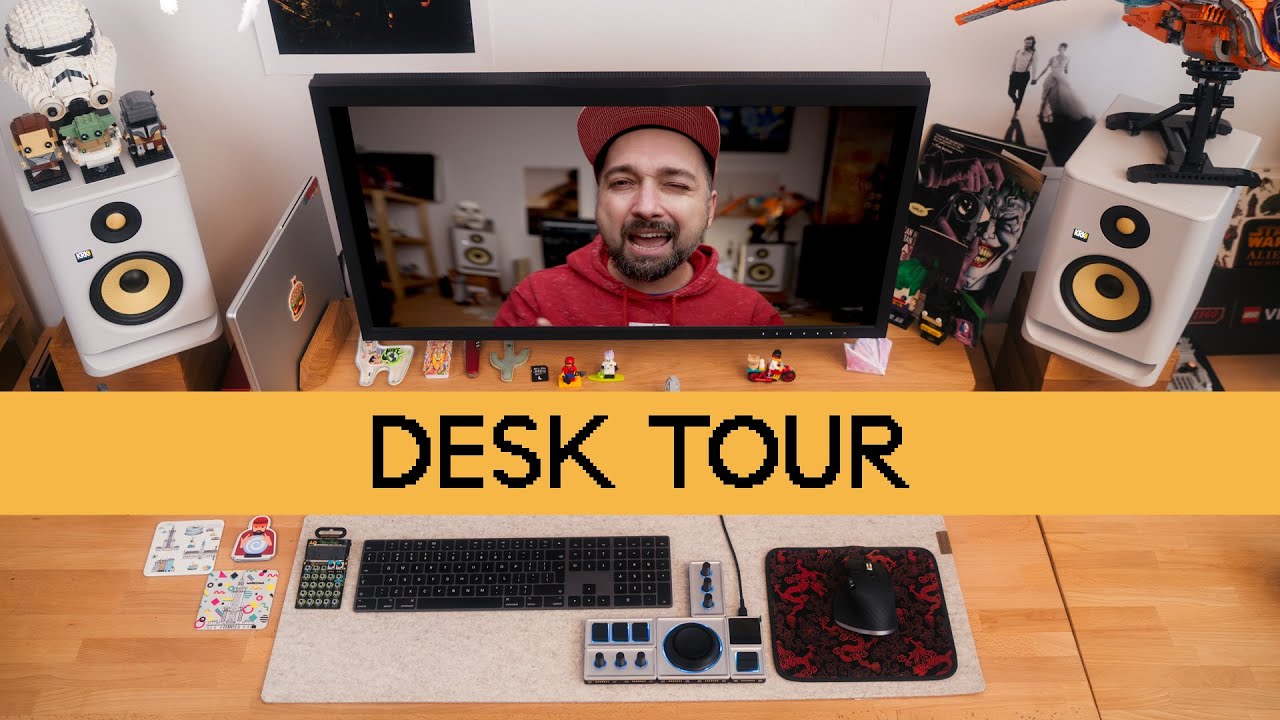
ウェディングフォトグラファーであり、Sony Europe Ambassador、そして人気YouTuberでもあるMagic氏が、彼の2023年版デスクセットアップを公開!多岐にわたる活動を支える彼の仕事場は、シンプルながらも選び抜かれたプロ仕様の機材がぎっしり詰まった、クリエイター必見の空間です。
彼のメインワークステーションは、2つのシンプルなIKEAデスクと引き出しキャビネットを組み合わせて作られています。ここに鎮座するのは、なんとフルスペックのMacBook Pro M1 Max(ストレージ2TB!)。このパワフルなマシンを、CalDigit TS4ドックステーションを使って Thunderboltケーブル1本で全ての周辺機器に接続しています。ケーブル1本で済むのは羨ましいですね!
ディスプレイには、写真編集に最適な31インチのEizo 4KモニターをDisplayPortで接続。AmazonのVesaデスクマウントでスッキリと配置されています。入力デバイスは、Apple Magic KeyboardとLogitech MXM 3Sマウスという人気の組み合わせ。そして、写真編集作業を効率化するために、Monogramコンソールも使用しています。
オーディオ環境も本格的。オーディオインターフェースはFocusrite 8i12、マイクはShure MV7です。スピーカーはKRK Rocket 5を、なんとバナナ柄の木箱の上に置いています!遊び心も忘れません。大量の撮影データを保存するため、Synology DS1618+ NASステーションに拡張ユニットを接続。10GBE Thunderboltアダプター経由で高速アクセスを実現しています。
動画では、あまりお勧めできないという正直なチェアの評価も(特定のモデル名は伏せられています)。さらに、Asus OLEDモニターとEpsonプリンターを備えたテスト用デスクや、レゴセットが飾られたYouTuber用のデスクといった、複数の作業スペースも紹介してくれます。
ウェディングフォトグラファーとYouTuberという二足のわらじを履く彼の、シンプルながらもプロフェッショナルな仕事環境は、多くのクリエイターにとって参考になるはずです!
Magic Wedding Photographerさんのセットアップで特に注目すべきポイントは、実用性とデザイン性のバランスです。日々の作業効率を高めながらも、見た目の美しさにもこだわった環境づくりが参考になります。
この動画で紹介されている全17点のアイテムを一覧にまとめました。
Magic氏の「My Desk Tour 2023」動画は、ウェディングフォトグラファー兼YouTuberという多忙なクリエイターが、いかにして効率的かつ快適に作業できる環境を構築しているのかを教えてくれます。シンプルながらも選び抜かれた機材と、それを最大限に活かすためのレイアウトや接続方法は、多くのクリエイターにとって実践的なヒントとなるでしょう。
この動画から得られる最大の利益は、自分の仕事内容やワークフローに合わせて最適なツールを選ぶことの重要性を学べる点です。写真編集、動画制作、データ管理といった各タスクに特化したアイテムを組み合わせることで、作業効率を劇的に向上させることができることがわかります。
また、IKEAのような手頃な家具と、ハイスペックなPCやモニター、オーディオ機器を組み合わせるというアプローチは、予算に合わせて最適なワークスペースを構築するための参考になります。
もしあなたがフォトグラファー、ビデオグラファー、あるいはその他のクリエイティブな活動をしていて、自分のデスク環境を改善したいと考えているなら、この動画はきっとあなたの背中を押してくれるはずです。さあ、この動画を参考に、あなたもプロフェッショナル仕様の、あなただけのデスクセットアップを構築してみませんか?きっと、あなたのクリエイティブな活動がさらに飛躍するはずですよ!